If you’ve ever worked on a slot machine game and noticed a strange click, gap, or stutter when a music loop restarts, chances are you’ve been bitten by the limitations of the MP3 format. Despite being one of the most common audio file types used across mobile and web games, MP3s come with a built-in problem that makes seamless looping an absolute nightmare pickle.
In this article, we’ll break down why MP3s struggle to loop cleanly, test some of the myths to see if any can help, and we’ll discuss what alternatives developers can use. Then we’ll explore how audio teams can work around the limitations when MP3 is your only option.
- The Problem – MP3 Gap
- Experiments – Theories That Don’t Work
- Other Formats
- Why MP3 Sometimes Works
- Solutions
- Giving Feedback
- TLDR – Instant Solutions
The Problem – MP3 Gap
A composer/sound designer can easily create a perfectly looping sound. Often this is achieved by taking the tail/reverb of the last part, and adding it into the beginning of the loop. Then when the sound restarts, you hear the last part blending into the start.
This works in the audio program, it works if exported as WAV or many other formats, but when exported as MP3… It’s broken.
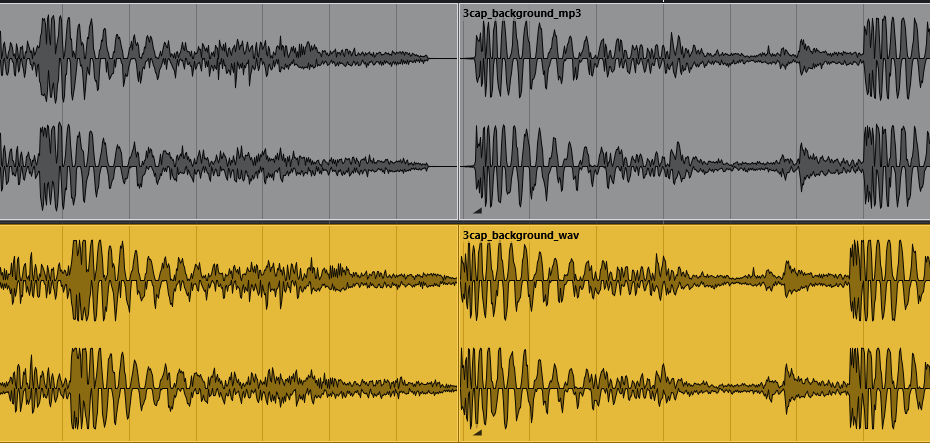
Here’s a track from a game called 3 Capybaras. We exported the track as WAV and also as MP3, then we imported to an audio program and duplicated it so you can see what it’ll be like when the end connects to the beginning. These videos are all just snippets with a few seconds on each side of that loop point. So the first half is last few seconds of the track, and the second half is the first few seconds. You can see a vertical line at the loop point, around 5sec into the video. The text above the waveform also helps to show where this is. If you make it full screen it’ll be even easier to spot.
So, here’s the seamlessly looping WAV:
Nice. You can even hear the reverby stuff in the background blending perfectly into the beginning. Now let’s see what happens to the MP3 we exported:
Jolt! This is actually a fairly tame example, but you can hear that MP3 encodes tiny silent gaps at the beginning and the end of the file. It’s small but makes a huge difference. You can see the gap in the image below. The bottom one (yellow) shows the WAV, where the waveform is continuing until the very end and then restarting immediately, while the MP3 version at the top (grey) shows the waveform reduced to a flat line for a moment on either side.
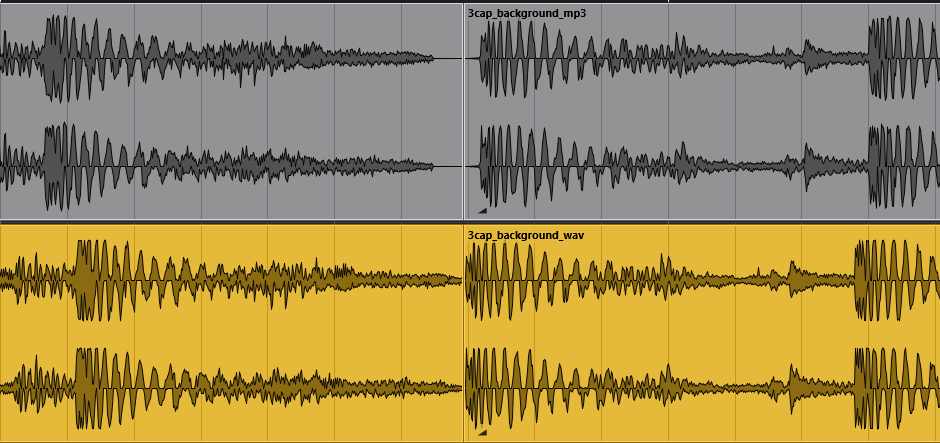
Do you see it? Let’s zoom in further.
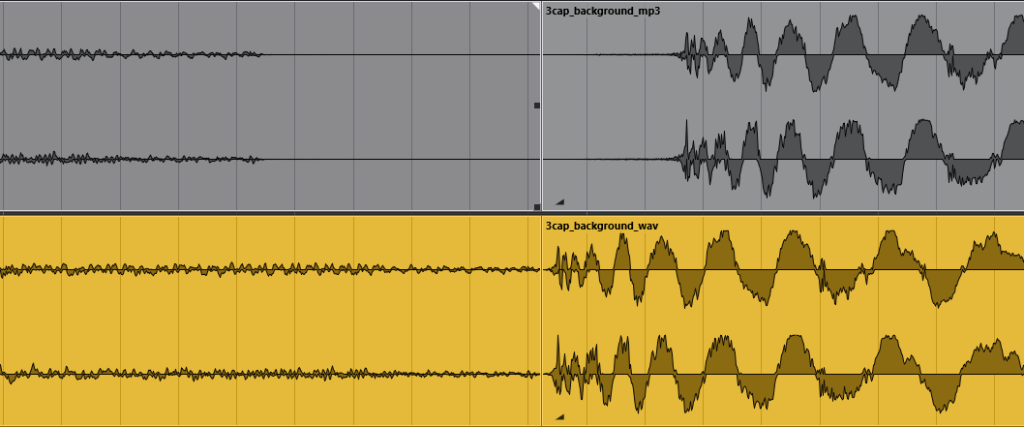
It’s an unfortunate fact of MP3 that we can’t get around. The composition loops seamlessly, but the MP3 padding encoding is out of anyone’s control. More technical details on this here.
These gaps can absolutely DECIMATE the flow of sounds in a game (this is of course on top of the general quality degradation the compression inflicts). The reverb tails added to the beginning will usually sound extremely strange after a small gap like that.
You can try skipping this technique, and it’ll help hide the loop gap, but won’t fix it entirely. Let’s try it out. Here’s another track from a game called Johnny Jungle, with reverb that loops well as WAV but not MP3.
WAV:
MP3:
Now here it is with the reverb removed from the beginning, a couple of elements removed altogether, and also with extremely dry instruments in general so they have really short tails.
In this case it has helped quite a bit, the loop is almost passable despite the gap still being there.
The problem though, is this is not an option for the more high-octane loops, like if you add excitement layers on top of the track, or just have crazy free spins music or winning loops. This technique will usually suck the energy out of the track, while also making the instruments sound less realistic.
Can you imagine doing that to this track?
WAV:
MP3:
You can, however, just apply this treatment purely to the ending instead of the whole track. This is essentially what tip #1 is about in the later section about things we can do to help disguise the loop gap.
Experiments – Theories That Don’t Work
If removing the tail isn’t the solution, what is? Let’s try out some of the other theories. We’ll go back to the original version for this, where the gap is more apparent for better testing.
Again for all these examples, we’ve applied the experiment, exported, then brought the track into an audio program to duplicate and zoom in on the point where the end meets the beginning.
1. Cut High Frequencies
MP3 encoding is hard on high frequencies. Perhaps their dampening contributes to the gap? If we cut the high frequencies before exporting the MP3 maybe we’ll save it the trouble.
Here it is with the highs generously lopped off.
Result: No improvement
2. Cut Low Frequencies
Maybe it’s the inaudible frequencies on the other end of the spectrum that cause the problems.
Here it is with excessive removal of the low frequencies.
Result: No improvement
3. Cut All Inaudible Frequencies
Ok, let’s try removing everything above AND below human hearing, and then some!
Most of it can’t be heard over phone speakers anyway right? So it’s unnecessary content. Here’s the result.
Result: No improvement
4. Higher Quality MP3s
MP3s are so drastically smaller than WAVs that we might not even need them to be that minuscule. So if we try going for a higher quality one, maybe we’ll get less padding?
Let’s try 96 Kb/s vs 320 Kb/s using the original loopable music.
Low quality:
High quality:
Result: No improvement
5. Try LAME
It could be the encoder. LAME is an MP3 encoder that supports metadata-based gapless playback. That sounds promising.
This is actually what we’ve been using in these examples. It doesn’t help when examining/playing back the file in our programs, and it’s also likely that the engines/browsers will not respect the metadata in these files.
One very important thing to note is that usually the DAW (audio software) that the composer/sound designer exports from will play the file back properly, with the padding trimmed, if they import it back into the same software.
For example, if we export MP3 from Cubase, then import it back into Cubase, it’ll play perfectly! But then if we try to play it in Reaper or anywhere else, you can see and hear the gap. And vice versa.
This can easily catch audio people out. If they tested the loop in their usual DAW and it worked fine, they’ll have a really hard time figuring out why it’s not working in-game.
6. … Mono?
Result: No Improvement
7. Shorter file lengths?
This is unfortunately even worse as it doesn’t fix the gap but instead you hear it more often. This is a particularly big problem with looping win sounds, which we discuss later on.
Why Not Just Use Better Formats Instead?
There are better formats, but each comes with its own tradeoffs:
WAV (.wav)
✅ Perfect for looping
✅ No compression artifacts
❌ Large file size
❌ Potential compatibility issues
Many slot devs rule this out purely because of the download weight.
For the 1min track that we use snippets from in most of the examples, these are the file sizes:
- MP3 – 44.1 khz, 128 Kb/s – 910 KB
- WAV – 44.1 khz, 16bit – 9.78 MB
If file size is your only concern, what if we just use ultra-low-quality WAVs??
- WAV – 16 khz, 8bit – 1.77 MB
This is a better size, but sounds very bad. Loops well though!
Ogg Vorbis (.ogg)
✅ Much better looping support than MP3
✅ Smaller than WAV
✅ Gapless by design
❌ Compatibility issues on older iOS devices
If you’re not targeting legacy devices or older mobile browsers, Ogg Vorbis is often the best alternative. It’s used in most other types of games.
- OGG – VBR Quality 0.5 – 1.1 MB
AAC (.m4a / .mp4)
✅ Far better looping behaviour than MP3
AAC still has encoder padding, but browsers support gapless metadata that lets decoders trim it correctly. Something MP3/LAME metadata may fail to do.
✅ Excellent compatibility
Works on all modern devices, including iOS, Android, browsers, and in-app WebViews.
✅ Smaller than WAV and usually higher quality than MP3
- M4A – 128 Kb/s – 1.12 MB
❌ Not natively gapless 100% of the time
There is still some small padding, and not all playback engines trim it perfectly. But it’s still significantly better than MP3.
Here it is looping the raw file:
Gap is still there, but it seems significantly less jarring.
AAC/M4A sits in the sweet spot for HTML5 slot development: small, efficient, widely supported, and capable of nearly gapless playback when decoded via the WebAudio API. If you’re able to use M4A in your pipeline, this is the best solution.
Then Why Have MP3s Worked Perfectly In Previous Slot Games?
There might’ve been times in the past you’ve used MP3 loops and not noticed these problems. Why is this?
The most likely answer, unfortunately, is luck. There’s no way to guarantee it, but sometimes a track will just luckily come out with less problematic padding. It will never be a seamless loop, but it might just turn out passable enough not to be flagged.
Here are some other possible explanations:
- The track was long enough that you rarely encountered the loop point.
- The track was in a style that naturally incorporated the techniques we explain in the next section.
- When testing in-game, the loop point was always masked by other sounds.
So What CAN We Do?
This is all useless information if we’re stuck with MP3 either way, so let’s have a look at some techniques that can actually help. Nothing beats a properly looping track, but these can at least make the gap feel more intentional and avoid the jolty glitchy sound.
Some of these pertain just to the background music loop, but some are more useful for other sounds in a slot game. Many of the following audio demonstrations are from various titles by Eyecon.
1. Build a deliberate, natural pause that fades to silence
Since the gap is going to be there either way, we might as well try to design it into the music. If we end the loop with a final chord or stinger that rests briefly, then have it begin again. This makes the pause feel intentional rather than broken. It helps to use instruments that have a very short tail to minimise this as much as possible.
Here are some examples:
Instead of this:
Try this:
And instead of this:
Try this:
Here’s another one:
Did you noticed in this last one that the constant ambience slightly helped with the gap too? The next tip explains this.
2. Use staggered layers
This one is more useful for looping background ambience. If your engine supports multiple looping files, try overlapping layers of different lengths so their loop points are at different times.
This way you can get away with using smoother fade in/outs on each layer, and it makes a more dynamic and randomised soundscape.
This can be done with certain types of music, but in a lot of styles you’d likely just be adding too much restriction and ending up with poorer audio overall. One situation it could work is something more ambient.
You could have one layer where ambient pads or strings are flowing in and out, and another layer where there’s sparse percussion ramping up and down, stopping and starting. Since the ambient layer doesn’t need to follow any particular timing, the percussive layer will never clash with it and the two layers are free to play against each other, masking all the loop points.
3. Emphasised fades
Use a longer fade at the start and end of your MP3 loop. While it won’t fully remove the gap, it can reduce the perceived jolt by smoothing the transition.
This isn’t ideal for the developers who like the music to be very upbeat and in your face. We work with some developers, however, who prefer the background music to be much more reserved.
With calm, slow music, you can gradually build up from one instrument at the beginning, and then clam back down to that one instrument at the end, just playing a beat here and there.
If you went for a longer track, you could have it do this throughout the track so it’s less obvious which dip is the loop point.
4. Masking
The best example of this is in big win sequences, when the animations progress through big win, super win, mega win and epic win. Usually the best method is to make combined files (as explained in tip #7), but it’s not uncommon for clients to request the following sounds:
- Big win loop
- Big win end
- Super win loop
- Super win end
- Mega win loop
- Mega win end
- Epic win loop
- Epic win end
This is handy during development because the lengths of the animations can be tweaked, and the music can just loop to fit in. The next loops are then triggered one after another until it reaches the relevant “end” sound. The problem of course, is this leads to a lot of weird gaps, jolts, clicks and pops! Like so:
Pretty nasty eh? To be honest, if we had to do it this way we would go back and extend the wins so that they last longer than the new win lengths, to reduce the chances of them having to loop. So it wouldn’t be QUITE that awful. Still, let’s see what this technique can do.
There are three sounds you can use to “mask” this mess:
Plaque Slam
This is what we call the SFX for the actual “BIG WIN” text appearing on screen. Sometimes it’s an explosion, sometimes it’s a splash, whatever the theme calls for. If this (or a different plaque slam for each level) is played at the same time that it progresses to the next win level, the issues are very well masked
Countup
The tickup/tally sound of the winnings number rising is definitely best kept in a separate file from the wins. If it’s long enough, the loop point of this sound will be at a different time to the win sound gaps. Then they can mask each other.
Coin Shower
Usually there are coins flying all over the place, or a themed equivalent, during big wins. This should also be on a different layer and long enough that its loop points are also at different times. This, the countup, and the win sounds will all mask each other’s jolts while the plaque slam covers the transitions.
Masked Result
It’s still a bit of a mess, but it’s an improvement. Hopefully it’ll help you think of other ways to solve problems with masking. For a much better solution though, check out the combined version (that we actually used for the game) in tip #7.
5. Longer files
Usually a slot game’s base game music is around 1min, but if you extended that to 3+ minutes the loop gap will be significantly less of a problem. It’ll come around less often, therefore there will be a higher chance of it being masked by other sounds when it does.
It’s not necessary to pay the audio team to compose 3+ minutes of music for this. Instead you could ask them to repeat the 1min track three times within the file. The gap won’t exist at the loop points in the middle of the file, it’ll only be at the very end and beginning.
The only problem with this is larger file sizes. You could compress it further to compensate, but depending on the music, you may end up degrading it too far.
This works very well, however, for other looping sounds like:
- Reel spin
- Countup/Tickup/Tally
- Anticipation
- Coin shower/particle FX
- Big Win music
Quite often if the developer wants looping win sounds, we’ll make a sound that fits the animation, but then also add one or two beats to the end. That way it will usually play as desired, but if some lag causes the win to last longer, it has some built in buffer so there’s less chance of it having to loop and glitch.
6. Mixing
If you have background ambience SFX (preferably layered and staggered as described in point 2.), you can bring that to the forefront and make the music more of a quieter background element. This will make the MP3 loop gap in the music way less noticeable.
Here’s the track we experimented on earlier, but with the ambience SFX removed and instead put on two different layers of different lengths. These staggered layers (mentioned in tip #2) definitely help the MP3 gaps on the ambience layers, but that doesn’t do anything for the actual music loop. But if we mix it so the ambience is the main focus, the music gap doesn’t sound so bad.
This can be applied in the win sequences mentioned earlier, and other areas too.
7. Combining
If you’re having trouble with the messy win sequences mentioned in tip #4, just make files where each outcome is combined.
For example, if your mega win always goes:
Big Win Intro (1sec) – Big Win (3sec) – Mega Win (4sec) – Mega Win End
You can just have the audio team make a sound where it all combines and transitions perfectly. Then also make a combined sound for super win and epic win etc. One file for each win size’s full sequence. Then you don’t have to worry about syncing up the different sections and causing all the jolts and gaps.
You can even add in the plaque slams, countups and coin showers to these combo files. Here’s the Pyramid of Ra demonstration from earlier. This is just one Epic Win file that includes all the other wins built in so we have more control over the transitions.
This is a very common technique and we’re noticing more and more clients requesting it. It feels a lot more polished and professional than the disjointed alternative.
Here’s another example, this time with some accentuated transitions between each section. These win sequence demonstrations are from Pyramid of Ra and Gumball 7s, both by Revolver Gaming.
If you’re interested in reading some of our other insights on win sounds in slot games, feel free to check out this short post. Wins can get messy very easily, but there’s a range of easy fixes!
8. Just… Don’t loop!
Often it’s best to just search for alternatives to looping.
Reel spin sounds are usually much nicer as oneshots that fade out. It doesn’t always perfectly match the animation to do it this way, but it’s becoming more common, and definitely doesn’t feel “wrong”. It can also reduce chances of the sound becoming annoying.
Anticipation risers can just be designed to the longest potential scenario, and looping win sounds always cause more work for the devs – much better to use designed sounds to set lengths.
Generally, any time that you can instruct the audio team to design to a specific animation/event length, you will end up with a significantly better sounding game.
Giving Feedback
If you’re a developer working with an audio team and you’re genuinely restricted to using MP3 for all audio, it might be handy to know what kind of feedback is most useful when the audio isn’t looping properly. The best thing to start with is to let them know what you’ve ruled out.
If you’re able to confirm that you understand the MP3 limitations, you’ll be able to get to a solution much quicker.
It can also help if you request assets delivered as both WAV and MP3 – then you can test the WAV to confirm if there’s a genuine problem in the audio or if it’s purely gap-related.
Just remember, do not test loops in a media player. Setting it to loop in something like Windows Media Player will always play with a gap, no matter what, even with WAVs. You’ll need to test it in your engine or in some kind of waveform editor like Audacity (which is free).
When you’ve confirmed the above with them, you’ll just need to let them know which drawbacks you’re most happy to accept. Many just accept the gap, but some prefer to go for one of the tips above and deal with the fact that they aren’t perfect either.
If you’ve chosen one of the above, like a composed, deliberate stop at the end of the music, there can still be good and bad attempts at it. You might find that it stops too abruptly, or that it’d be better if a different instrument is used for the final note. This is the kind of information that will get the problem solved verily speedy-fast.
TLDR – Instant Solutions List
In summary, if you’re using MP3s and want a quick solution to bad loops, here are your options from best to worst:
- Use .ogg instead
- Use .m4a instead
- Choose a solution with drawbacks from the list
- Come up with a new solution (and tell us about it!)
I really hope you find this article helpful, even if you just passive-aggressively sent the link to someone else. If you need help with audio in your projects, feel free to reach out. We’re a friendly team with vast experience in all the problems that slot game audio can present.
audio@betsound.co.uk.